PMT: work out any loan payment
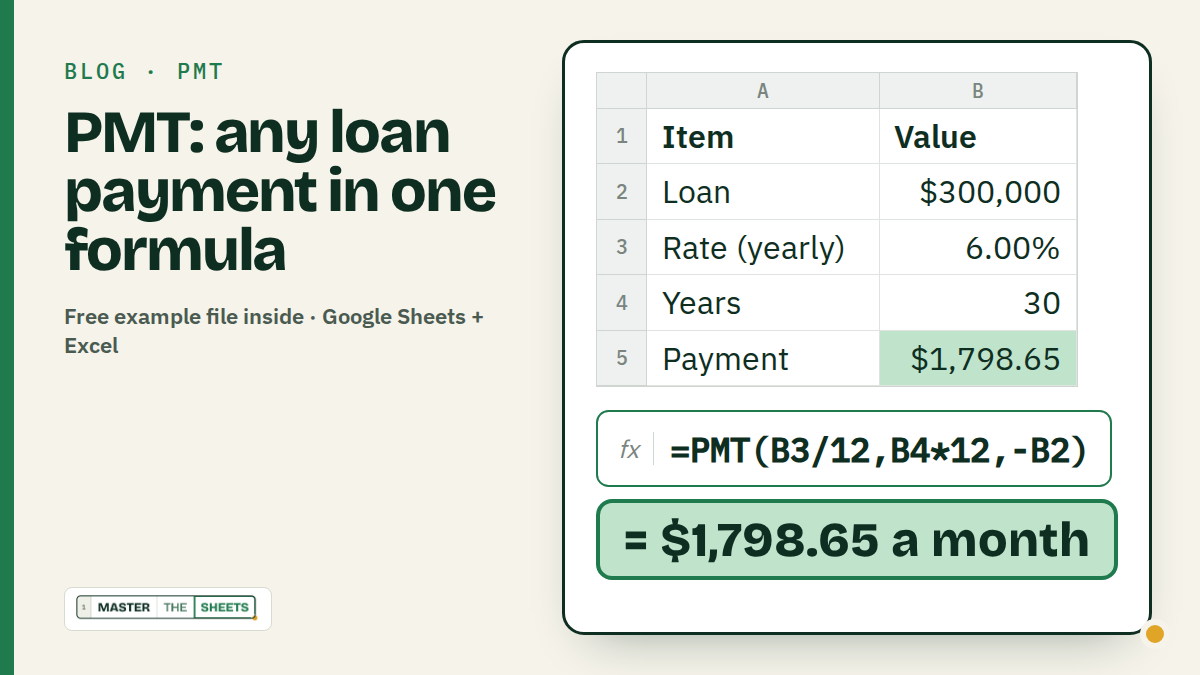
PMT gives you the fixed payment on a loan: =PMT(yearly rate/12, years*12, -loan amount). A $300,000 mortgage at 6% for 30 years is =PMT(6%/12, 30*12, -300000) → $1,798.65 a month. It works the same in Google Sheets and Excel.
There are specific cases in life that are not always comfortable and nice, but in the long run our decisions will have great effects on our lives, in bad or good ways.
Getting a mortgage or a loan is something like this. You don't do it for fun, but you are probably about to make a 20-year-lasting decision. In these cases PMT is your go-to function.
In a nutshell, the PMT function in Excel calculates the periodic payment for a loan or an annuity based on constant payments and a fixed interest rate.
Here are some examples below.
How PMT works
=PMT(rate, number_of_periods, present_value, [future_value], [end_or_beginning])- rate: the interest rate per period. Banks quote a yearly rate, you pay monthly, so divide by 12.
- number_of_periods: how many payments in total. 30 years of monthly payments = 30 × 12 = 360.
- present_value: the loan amount. Put a minus in front of it (you will see why in a second).
- future_value (optional): the amount you want to have at the end. 0 for a loan, your target for a savings goal.
- end_or_beginning (optional): 0 (the default) if you pay at the end of each period, 1 at the start. Leave it out for normal loans.
Why the minus? PMT thinks in cash flows. The bank gives you money (a plus), so your payments come out as a minus. Put the minus on the loan amount and the payment shows up as a normal, positive number.
1. A mortgage: the monthly payment
You found the flat. The bank offers $300,000 at 6% a year for 30 years. What does that mean every month?
| A: Item | B: Value | |
|---|---|---|
| 2 | Loan amount | $300,000 |
| 3 | Interest rate (yearly) | 6.00% |
| 4 | Years | 30 |
| 5 | Monthly payment | (formula) |
In B5:
=PMT(B3/12, B4*12, -B2) → $1,798.65Pro tip: type the rate as 6% (or 0.06), not 6. Typed as 6, Sheets reads it as 600% a year and you get a scary number.
This is principal and interest only. Property tax, insurance and fees come on top.
2. A car loan with a down payment
The car costs $32,000, you put $4,000 down, and the dealer offers 7.5% for 60 months. Here the term is already in months, so no × 12.
| A: Item | B: Value | |
|---|---|---|
| 2 | Car price | $32,000 |
| 3 | Down payment | $4,000 |
| 4 | Interest rate (yearly) | 7.50% |
| 5 | Months | 60 |
| 6 | Monthly payment | (formula) |
| 7 | Total interest | (formula) |
=PMT(B4/12, B5, -(B2-B3))        → $561.06
=B6*B5-(B2-B3)                   → $5,663.75
You borrow the price minus the down payment, so the loan is B2-B3. With no down payment at all (=PMT(B4/12, B5, -B2)) the payment is $641.21.
3. The real price: total interest, 30 vs 15 years
The monthly payment is only half the story. Multiply it by the number of payments and take away the loan: what's left is the interest you pay the bank.
| A: Loan | B: Rate | C: Years | D: Payment | E: Total paid | F: Total interest | |
|---|---|---|---|---|---|---|
| 2 | $300,000 | 6.00% | 30 | (formula) | (formula) | (formula) |
| 3 | $300,000 | 6.00% | 15 | (formula) | (formula) | (formula) |
In D2, E2 and F2, then fill down to row 3:
=PMT(B2/12, C2*12, -A2)        → $1,798.65   (row 3: $2,531.57)
=D2*C2*12                      → $647,514.57 (row 3: $455,682.69)
=E2-A2                         → $347,514.57 (row 3: $155,682.69)
The 15-year loan costs $732.92 more a month, but you keep $191,831.88 of interest (=F2-F3). That's the kind of number worth seeing before you sign.
4. What if you pay a bit extra every month?
A $25,000 student loan at 5.5% on a 10-year plan. You can afford $100 more a month. How much sooner are you free? For this one you need PMT's sibling, NPER: give it the payment and it tells you the number of months.
| A: Item | B: Value | |
|---|---|---|
| 2 | Student loan | $25,000 |
| 3 | Interest rate (yearly) | 5.50% |
| 4 | Years | 10 |
| 5 | Monthly payment | (formula) |
| 6 | Extra per month | $100 |
| 7 | Months to pay off | (formula) |
=PMT(B3/12, B4*12, -B2)          → $271.32
=NPER(B3/12, B5+B6, -B2)         → 80.7 months
About 6 years and 9 months instead of 10 years. The interest drops from $7,557.88 (=B5*B4*12-B2) to about $4,964 (=(B5+B6)*B7-B2): roughly $2,590 saved for $100 a month.
Paying down several debts at once? The Debt Payoff Planner shows the snowball and avalanche order side by side.
5. A savings goal: PMT works backwards too
PMT isn't only for debt. You want $20,000 for a deposit in 3 years, and your savings account pays 4% a year. How much do you put away each month? Start from 0 (third argument) and put the goal in the fourth.
| A: Item | B: Value | |
|---|---|---|
| 2 | Savings goal | $20,000 |
| 3 | Interest rate (yearly) | 4.00% |
| 4 | Years | 3 |
| 5 | Save per month | (formula) |
=PMT(B3/12, B4*12, 0, -B2) → $523.81You put in $18,857.27 (=B5*B4*12) and interest adds the other $1,142.73. Same minus trick: the goal is money you get, so it goes in with a minus to make the saving positive.
6. Where does your payment actually go? IPMT and PPMT
Each payment is part interest, part loan. At the start it's mostly interest, which is why balances fall so slowly in the first years. Back to the mortgage from example 1, with the payment number in B6:
| A: Item | B: Value | |
|---|---|---|
| 2 | Loan amount | $300,000 |
| 3 | Interest rate (yearly) | 6.00% |
| 4 | Years | 30 |
| 5 | Monthly payment | $1,798.65 |
| 6 | Payment number | 1 |
=IPMT(B3/12, B6, B4*12, -B2)        → $1,500.00   (interest)
=PPMT(B3/12, B6, B4*12, -B2)        → $298.65     (principal)
The two always add up to the payment. In payment 1, only $298.65 of your $1,798.65 pays off the loan. By payment 360, the interest part is down to $8.95.
Common mistakes
- Forgetting to divide the rate by 12.
=PMT(6%, 360, -300000)treats 6% as a monthly rate and gives about $18,000 a month. Rate and periods must use the same unit. - Years instead of months.
=PMT(6%/12, 30, -300000)means 30 monthly payments: $10,793.68 a month for two and a half years. Multiply years by 12. - A negative payment. Not an error, just PMT's sign rule. Put a minus before the loan amount to flip it.
- Typing the rate as 6. Use
6%or0.06. A plain 6 means 600%. - Expecting taxes and insurance. PMT covers principal and interest only. Add escrow, PMI or fees yourself.
FAQ
What does the PMT function do in Excel? It returns the fixed payment for a loan (or a savings plan) with a constant interest rate: =PMT(rate, number_of_periods, present_value). Google Sheets uses exactly the same syntax.
Why is my PMT result negative? PMT shows money going out as a negative number. Write the loan amount with a minus (-B2) and the payment turns positive.
How do I calculate the total interest on a loan? Multiply the payment by the number of payments and subtract the loan: =PMT(B3/12, B4*12, -B2)*B4*12-B2. For $300,000 at 6% over 30 years that's $347,514.57.
Can PMT calculate how much to save each month? Yes. Use 0 as the present value and your goal as the future value: =PMT(4%/12, 36, 0, -20000) → $523.81 a month.
Keep going
- Practise percentages and ROUND for free in the White Belt course.
- Next read: Debt snowball vs avalanche and The 50/30/20 budget.
Written by MasterTheSheets