XLOOKUP vs VLOOKUP vs INDEX/MATCH: which one to use
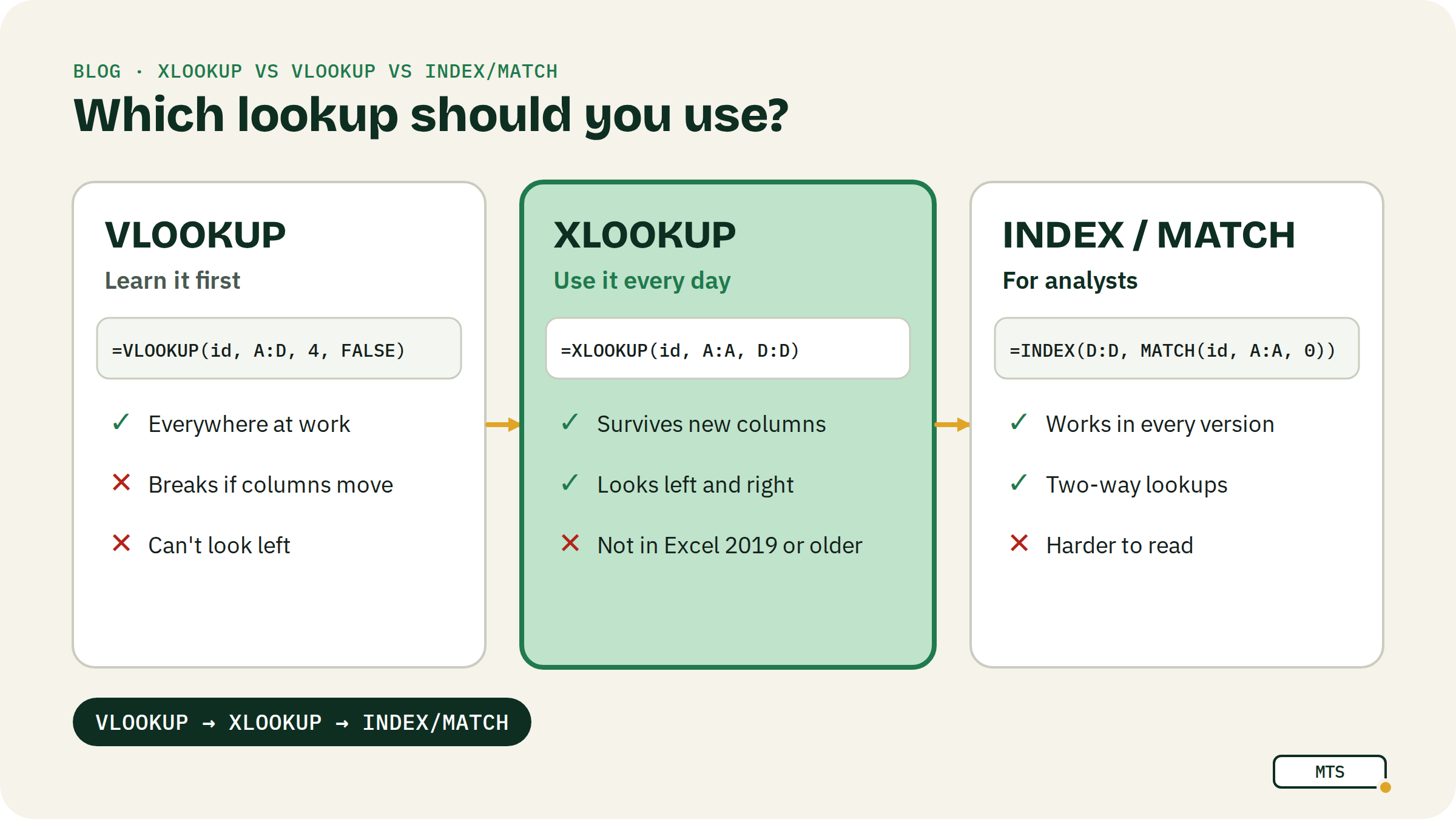
Short answer: learn VLOOKUP first, because you'll meet it in every workplace. Switch to XLOOKUP when your tables start changing. Learn INDEX/MATCH if you're heading for a data analyst job or work in older Excel files. For a basic user, INDEX/MATCH is overkill.
I tend to simplify life as much as possible. For example, we often put people into made-up groups: people who like coriander and people who don't, people by age, by job level and so on.
There is a grouping in spreadsheet terms too: 1. people who can use VLOOKUP, and 2. people who can't.
Jokes aside, during my career I've run Excel and Google Sheets training for very different audiences. In my view, someone's willingness to learn VLOOKUP is a pretty good predictor of where their spreadsheet skills are heading.
And here is the twist. You give yourself a hard time, you finally get used to VLOOKUP, and then you realise: IT BREAKS ANY TIME YOU CHANGE THE TABLE.
This is when XLOOKUP comes in.
The example: one price list, three formulas
| A: Product ID | B: Product | C: Category | D: Price | |
|---|---|---|---|---|
| 2 | P-101 | Flat white | Coffee | 3.80 |
| 3 | P-102 | Oat latte | Coffee | 4.20 |
| 4 | P-103 | Croissant | Bakery | 2.90 |
| 5 | P-104 | Banana bread | Bakery | 3.50 |
| 6 | P-105 | Lemonade | Drinks | 3.00 |
The question: what's the price of P-104?
=VLOOKUP("P-104", A2:D6, 4, FALSE)                  → 3.50
=XLOOKUP("P-104", A2:A6, D2:D6, "Not found")         → 3.50
=INDEX(D2:D6, MATCH("P-104", A2:A6, 0))              → 3.50
Same answer, three ways. The differences show up when things change.
VLOOKUP: the one everyone should know
=VLOOKUP(what, table, column number, FALSE) looks for the value in the first column of the table and returns what's in the column number you give (4 = Price here) of the same row.
Why it breaks:
- The column number is typed in. Insert a new column between Category and Price, and “column 4” is now the wrong column. No error, just a wrong answer. This is the moment most people discover the problem.
- It can only look to the right. The value you search for must be in the first column. Want the Product ID for “Lemonade”? VLOOKUP can't do it without rearranging the table.
- The FALSE at the end is easy to forget. Without it, VLOOKUP does an approximate match and can return a neighbouring row's value. Always write FALSE (or 0).
My suggestion: learn it and practise it 100 times anyway. Colleagues, old files and job interviews will all use it.
XLOOKUP: the modern default
=XLOOKUP(what, where to look, what to return, [if not found])
- You point at the two columns directly, so inserting columns doesn't break anything.
- It looks left too:
=XLOOKUP("Lemonade", B2:B6, A2:A6)returns P-105. - Exact match is the default, and the “not found” message is built in.
- Available in Google Sheets, Microsoft 365 and Excel 2021 or newer. Not in Excel 2019 or older, so check before you send a file to someone on an old version.
If you work with big tables that change, move to XLOOKUP and don't look back.
INDEX/MATCH: the analyst's tool
=INDEX(what to return, MATCH(what, where to look, 0))
- MATCH finds the row number, INDEX returns the value from that row.
- It does everything XLOOKUP does (left lookups, no column counting) and works in every version of Excel and Sheets.
- It's more flexible for advanced cases, like looking up a row and a column at the same time:
=INDEX(B2:M20, MATCH(name, A2:A20, 0), MATCH(month, B1:M1, 0)).
If you find yourself in a job with “Data analyst” in the title, INDEX/MATCH becomes a bit of a prestige thing, on top of the advanced skills. For everyone else, XLOOKUP does the same job with less typing.
Side by side
| VLOOKUP | XLOOKUP | INDEX/MATCH | |
|---|---|---|---|
| Survives inserted columns | No | Yes | Yes |
| Looks left | No | Yes | Yes |
| Exact match by default | No (add FALSE) | Yes | No (add 0) |
| Built-in “not found” | No (wrap in IFERROR) | Yes | No (wrap in IFERROR) |
| Works in old Excel (2019 and older) | Yes | No | Yes |
| Easiest to learn | Yes | Yes | No |
| Best for | Everyone, first | Everyday work | Analysts, old files, 2-way lookups |
Common mistakes
- Leaving out FALSE in VLOOKUP. The formula looks fine, the answer is wrong.
- Extra spaces. “P-104 ” with a trailing space won't match “P-104”. Clean the data with TRIM.
- Numbers vs text. An ID stored as text ("104") won't match the number 104.
- Not locking the table. When you fill a lookup down, use
$A$2:$D$6, or the table slides down with it.
FAQ
Is XLOOKUP better than VLOOKUP? For new work, yes: it doesn't break when columns move, it looks in both directions and it defaults to an exact match. VLOOKUP is still worth knowing because it's everywhere.
Does Google Sheets have XLOOKUP? Yes, it works the same way as in Excel.
Is INDEX/MATCH faster? On very large sheets it can be, but for everyday files you won't notice. Choose based on compatibility and readability.
Which one do interviewers ask about? VLOOKUP almost always; INDEX/MATCH or XLOOKUP for analyst roles. Knowing why VLOOKUP breaks is a great interview answer.
Keep going
- Next read: SUMIFS explained with 5 real examples and The FILTER function in Google Sheets.
- Start from zero with the free White Belt course.
Written by MasterTheSheets